단순한 채팅 상호작용뿐만 아니라 내용 요약, 번역 등 다방면으로 활용 가능한 ChatGPT를 프로그램에서 사용할 수 있도록 OpenAI에서 제공하는 GPT API를 사용하기 위한 조건과 사용방법에 대해 알아보자.
- 사용 조건
- OpenAI에서는 기본적으로 gpt-3.5-turbo를 포함한 여러 모델을 무료로 제공하며 결제내역이 있다면 gpt-4 모델을 추가로 제공한다. 채팅모델뿐 만 아니라 텍스트나 이미지를 처리해주는 다양한 모델도 지원하나 본 글에서는 채팅모델인 gpt에 대해서만 다루겠다. 제공하는 모든 모델 목록은 여기에서 확인할 수 있다.
- Rate limit
- 기본적으로 분당 3회, 일당 200회 request를, 결제를 했을 경우 분당 3500회의 request를 제공한다. 16k 모델 또는 GPT-4를 사용할 경우 다를 수 있다. TPM(Token Per Minute)을 포함한 세부적인 내용은 아래와 같다. 아래의 내용은 2023년 9월 기준으로 추후에 변경될 가능성이 있다.
- Free User
- 기본적으로 분당 3회, 일당 200회 request를, 결제를 했을 경우 분당 3500회의 request를 제공한다. 16k 모델 또는 GPT-4를 사용할 경우 다를 수 있다. TPM(Token Per Minute)을 포함한 세부적인 내용은 아래와 같다. 아래의 내용은 2023년 9월 기준으로 추후에 변경될 가능성이 있다.
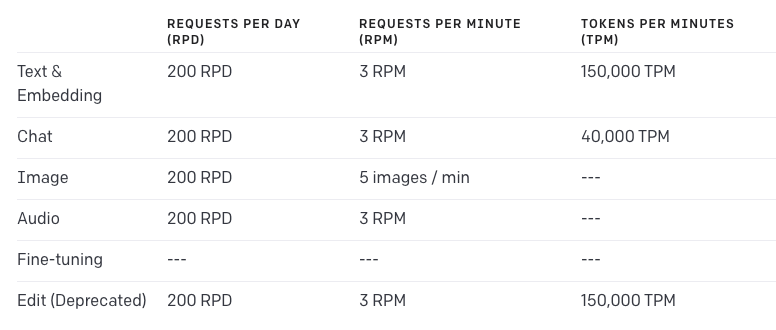
- Paid User - 결제 후 48시간이 지나면 업그레이드 된다.
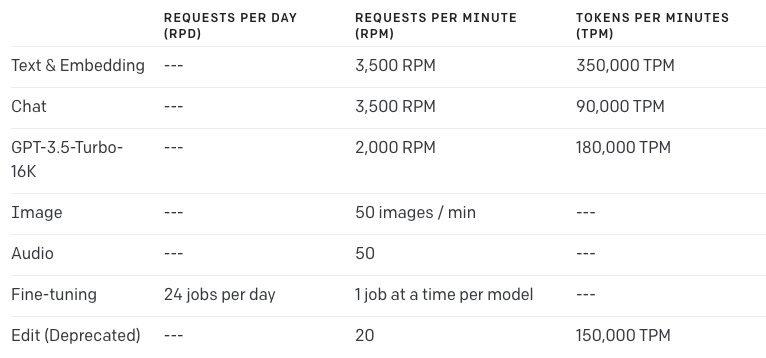
- GPT-4의 경우 계정마다 다를 수 있으나 두다지 계정의 경우 10000 TPM, 200 RPM을 제공한다.
- 자신의 계정이 사용할 수 있는 모델 목록과 각 모델의 rate limit을 확인하고 싶다면 여기에 나와있다.
- API errors
- 401 - API key가 잘못된경우 발생한다. 속한 조직의 계정에 문제가 없는지 또는 API key가 올바른지 확인해봐야한다.
- 429 - rate limit에 도달했을경우 발생한다. 여기에서 사용량을 확인해볼 수 있다.
- 500 - GPT 서버에서 문제가 생겼을경우 발생한다. 잠깐 기다린 뒤 request를 재시도하거나 문제가 지속될 경우 직접 문의해봐야한다.
- 503 - GPT 서버에 트래픽이 너무 많을경우 발생한다.
- 사용 방법
- 설치
pip install --upgrade openai
- API KEY 등록
export OPENAI_API_KEY='sk-...'- 환경변수로 등록해놓을 경우 라이브러리 import 시 해당 키를 읽어 사용한다.
- 기본적인 API 사용 예시
- gpt-3.5-turbo 모델에 “Hello world”를 입력하는 것을 API를 사용해서 수행해보자.
- 코드
- 설치
import openai

completion = openai.ChatCompletion.create(
    model="gpt-3.5-turbo", messages=[{"role": "user", "content": "Hello world"}]
)

# response message in string
print(completion.choices[0].message.content)- 출력 → Hello! How can I assist you today?
- completion
- 객체단순히 GPT가 대답해주는 메시지 뿐 만아니라 id, 사용한 모델, 객체, 생성시간(Timestamp), 사용한 토큰 개수 등 여러 정보들을 알 수 있다.
{
  "id": "chatcmpl-82auU9UQcA2X57YwNk8BMSeIFYSGe",
  "object": "chat.completion",
  "created": 1695629230,
  "model": "gpt-3.5-turbo-0613",
  "choices": [
    {
      "index": 0,
      "message": {
        "role": "assistant",
        "content": "Hello! How can I assist you today?"
      },
      "finish_reason": "stop"
    }
  ],
  "usage": {
    "prompt_tokens": 9,
    "completion_tokens": 9,
    "total_tokens": 18
  }
}- 연속적인 채팅 예시
- ChatGPT에서는 연속적으로 대화를 이어나간다. 이를 API를 이용해서 수행해보자.
- 코드
import openai

messages = []

while True:
    user_message = input("user : ")
    messages.append({"role": "user", "content": user_message})
    completion = openai.ChatCompletion.create(model="gpt-3.5-turbo", messages=messages)
print("GPT : ", completion.choices[0].message.content)- 출력
user : a is 1
GPT :  That statement is correct. In this case, "a" is equal to 1.
user : b is 23
GPT :  c is 45
user : c is a+b
GPT : c is 24- 함수 호출 예시
- ChatGPT에서 입력값에 따라 별도의 함수를 실행할 수 있다. 순서는 다음과 같다.
- 유저가 정의한 함수에 대해 가능한 함수 목록들을 request 메시지와 함께 GPT에 전달해준다.
response_message에서 GPT가 함수 호출을 필요로 하는지 확인한다.- 필요로하는 function call 을 실행한다.
- function call의 반환값을 추가하여 gpt에 다시 한번 요청한다.
- ChatGPT에서 입력값에 따라 별도의 함수를 실행할 수 있다. 순서는 다음과 같다.
- 코드
def get_current_weather(location, unit="fahrenheit"):
    """Get the current weather in a given location"""
    weather_info = {
        "location": location,
        "temperature": "72",
        "unit": unit,
        "forecast": ["sunny", "windy"],
    }
    return json.dumps(weather_info)


def get_foo(location, foo):
    test_info = {
        "location": location,
        "foo": foo,
    }
    return json.dumps(test_info)


def run_conversation():
    # Step 1: send the conversation and available functions to GPT
    messages = [{"role": "user", "content": "what is xpath?"}]
    functions = [
        {
            "name": "get_current_weather",
            "description": "Get the current weather in a given location",
            "parameters": {
                "type": "object",
                "properties": {
                    "location": {
                        "type": "string",
                        "description": "The city and state, e.g. San Francisco, CA",
                    },
                    "unit": {"type": "string", "enum": ["celsius", "fahrenheit"]},
                },
                "required": ["location"],
            },
        },
        {
            "name": "get_foo",
            "description": "test",
            "parameters": {
                "type": "object",
                "properties": {
                    "location": {
                        "type": "string",
                        "description": "The city and state, e.g. San Francisco, CA",
                    },
                    "foo": {"type": "string"},
                },
                "required": ["location", "foo"],
            },
        },
    ]
    response = openai.ChatCompletion.create(
        model="gpt-3.5-turbo-0613",
        messages=messages,
        functions=functions,
        function_call="auto",  # auto is default, but we'll be explicit
    )
    response_message = response["choices"][0]["message"]
    print(response_message)
    # Step 2: check if GPT wanted to call a function
    if response_message.get("function_call"):
        # Step 3: call the function
        # Note: the JSON response may not always be valid; be sure to handle errors
        available_functions = {
            "get_current_weather": get_current_weather,
            "get_foo": get_foo,
        }  # only one function in this example, but you can have multiple
        function_name = response_message["function_call"]["name"]
        function_to_call = available_functions[function_name]
        function_args = json.loads(response_message["function_call"]["arguments"])

        if function_name == "get_current_weather":
            function_response = function_to_call(
                location=function_args.get("location"), unit=function_args.get("unit")
            )
        else:
            function_response = function_to_call(
                location=function_args.get("location"), foo=function_args.get("foo")
            )

        # Step 4: send the info on the function call and function response to GPT
        messages.append(response_message)  # extend conversation with assistant's reply
        messages.append(
            {
                "role": "function",
                "name": function_name,
                "content": function_response,
            }
        )  # extend conversation with function response
        second_response = openai.ChatCompletion.create(
            model="gpt-3.5-turbo-0613",
            messages=messages,
        )  # get a new response from GPT where it can see the function response
        return second_response


print(run_conversation())- 실행 결과
- What's the whether in Boston?
# First Response Message
{
  "role": "assistant",
  "content": null,
  "function_call": {
    "name": "get_current_weather",
    "arguments": "{\n  \"location\": \"Boston\"\n}"
  }
}

The weather in Boston is currently sunny and windy with a temperature of 72 degrees Fahrenheit.- What’s the foo in Boston?
# First Response Message
{
  "role": "assistant",
  "content": null,
  "function_call": {
    "name": "get_foo",
    "arguments": "{\n  \"location\": \"Boston\",\n  \"foo\": \"Boston\"\n}"
  }
}

The foo in Boston is bar.- Hello World
# First Response Message
{
  "role": "assistant",
  "content": "Hello! How can I assist you today?"
}
None- GPT가 입력되는 메시지를 보고 등록된 함수중 사용할 필요가 있다고 판단될 경우 메시지는 없이 해당 함수를
function_call에 넣은 뒤 반환한다. 해당 정보를 가지고 함수를 호출한 뒤 함수의 리턴 값과 등록된 함수명을 사용하여 GPT에게 request를 보낸다. - 플러그인과 유사하게 특정 목적을 위해 튜닝할 경우 유용할 것 같다.
ℹ️
gom(서민석)
한국 서버 개발
한국 서버 개발