In the era of bots, emulators, and modded apps, trusting client requests blindly is a recipe for disaster. To protect critical flows like Registration and Login, we need hardware-level authentication. How can a Backend truly know a request is coming from a "real user" on a "physical device", rather than a Python script or a repackaged app?
In this post, I’ll share my hands-on experience integrating Google Play Integrity (Android) and Apple App Attest (iOS) to build a multi-layered defense system.
1. At a glance
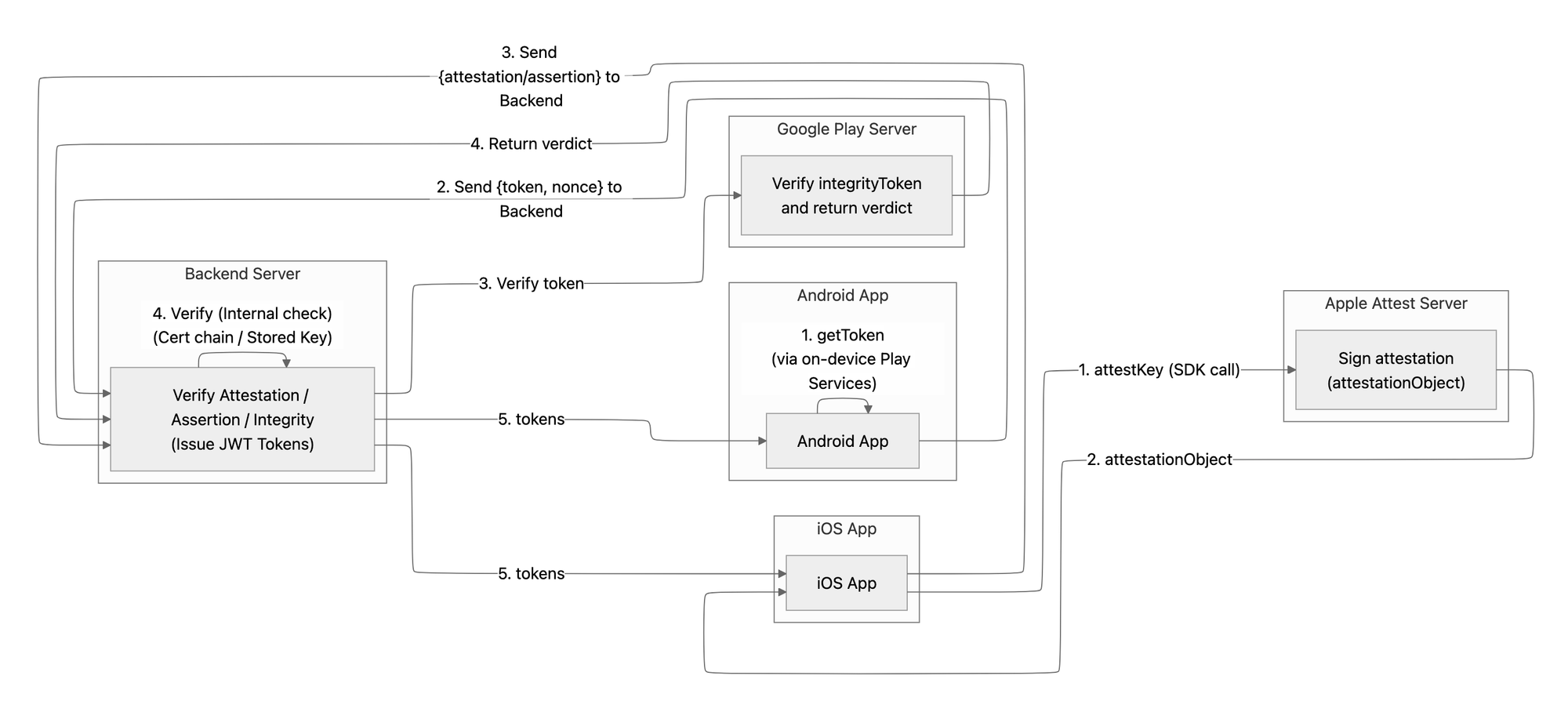
In my experience, the biggest difference between the two platforms lies in how they handle the "session":
- iOS (App Attest): Focuses on "Key Persistence." You register a key once and use it to sign future requests.
- Android (Play Integrity): Focuses on "Per-request Integrity." It typically involves getting a fresh verdict for specific actions.
| Feature | Google Play Integrity (Android) | Apple App Attest (iOS) |
| Philosophy | Stateless: Request a fresh "passport" whenever needed. | Stateful: Register a persistent "signature" for the device. |
| Backend Storage | None required (except for logs/nonces). | Mandatory: Must store PublicKey and signCount. |
| Complexity | Lower (relies heavily on Google’s Cloud API). | Higher (requires manual CBOR parsing and Cert chain verification). |
| Replay Protection | Based on the nonce bundled within the token. | Based on incremental signCount and challenge. |
2. Deep Dive into Implementation
2.1. Apple App Attest (iOS)
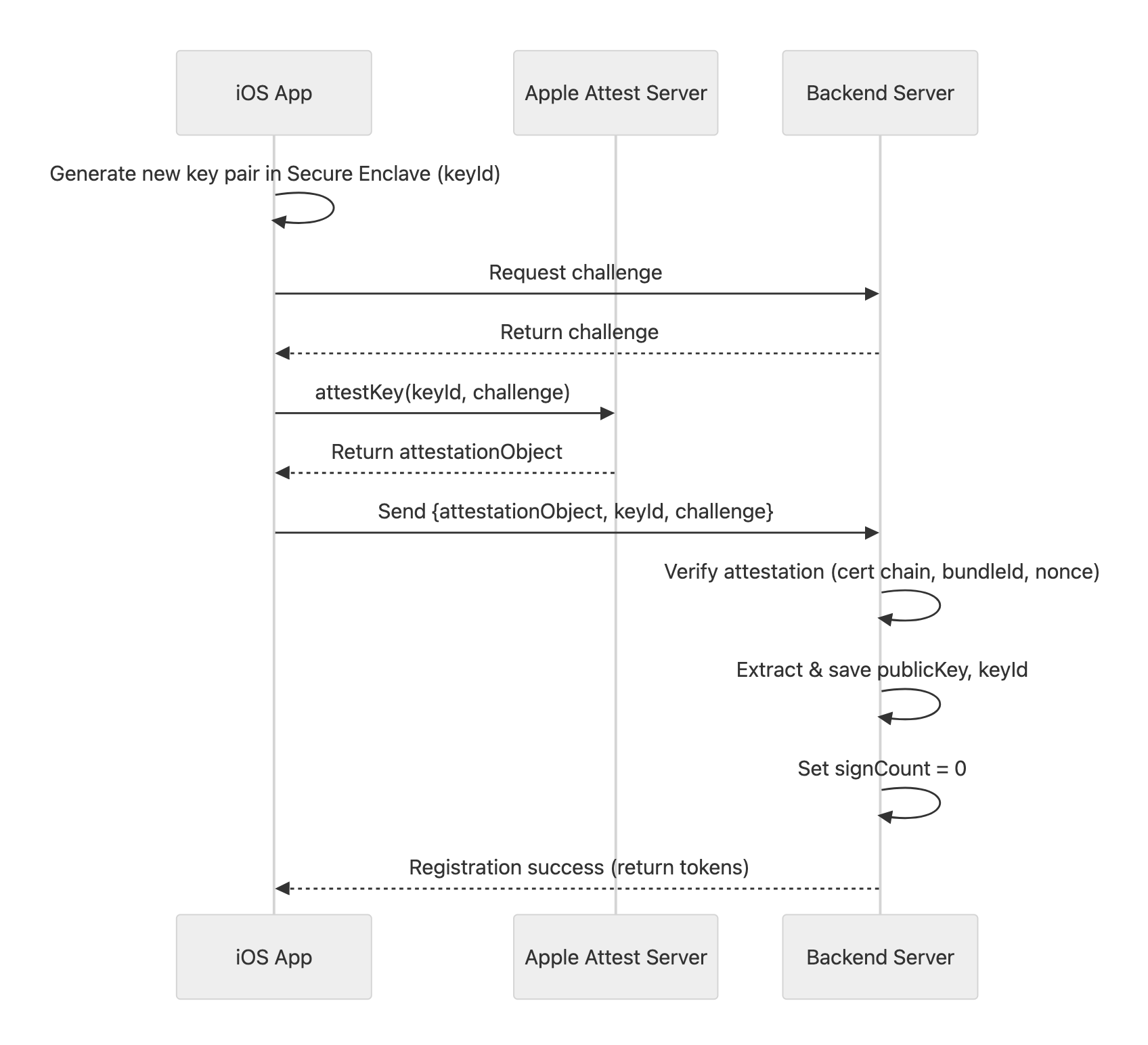
How it works: iOS operates in two stages: Attestation (Key Creation) and Assertion (Request Validation).
Stage 1: Attestation (Registration) When a user registers or switches devices, the app generates a key pair in the Secure Enclave. Apple signs this to certify the key originated from a legitimate device.
Stage 2: Assertion (Authentication) For every subsequent critical API call, the app uses the Private Key to sign a challenge. The Backend uses the stored Public Key to verify it.
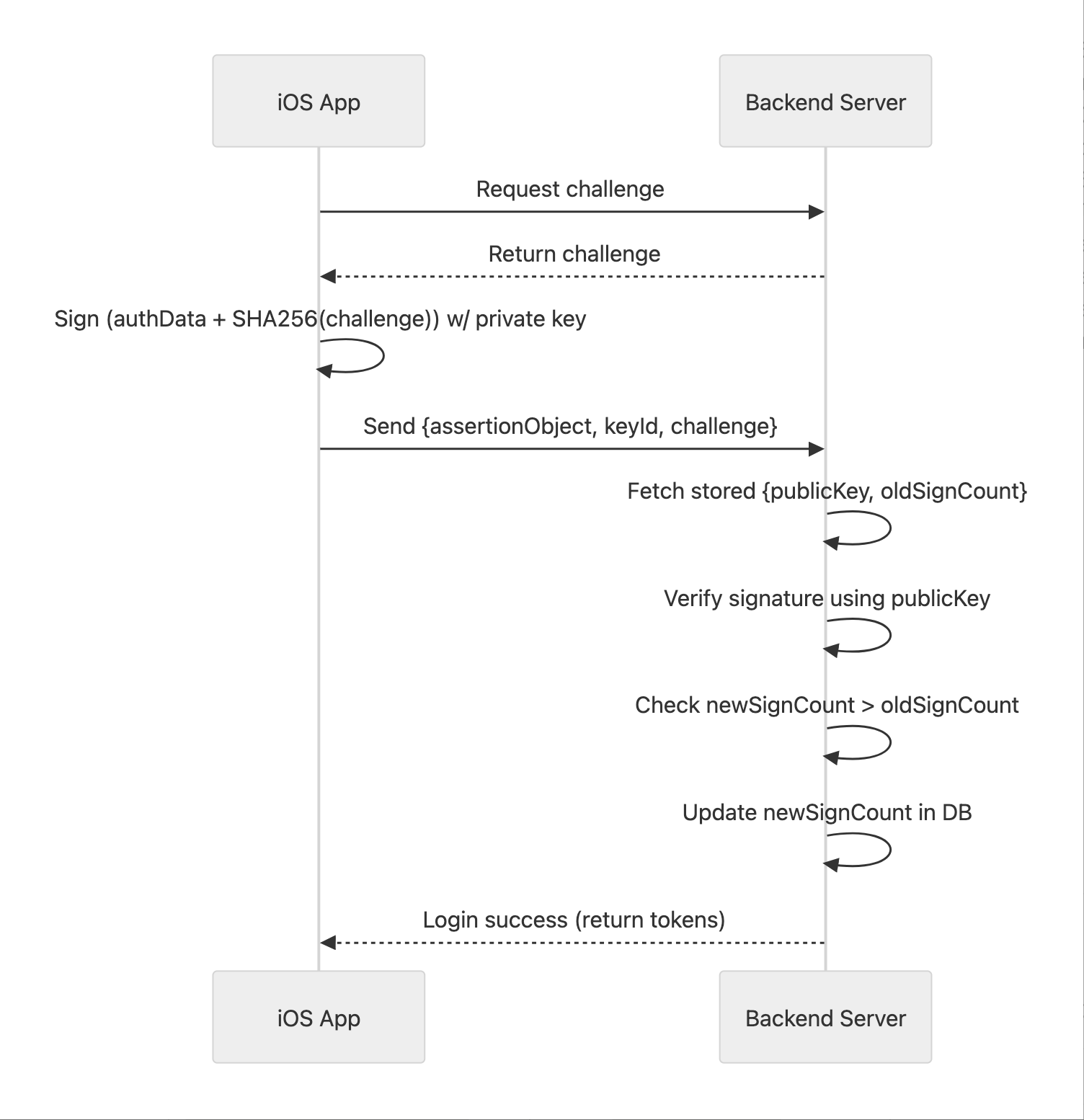
Note: The Backend must verify that newSignCount > oldSignCount to prevent replay attacks from intercepted requests.Implementation Example - Attestation & Assertion (Swift)
// 1. Attestation
func getAttestationData() async throws -> AttestationData {
    let keyId = try await service.generateKey()Enclave
    let challengeHash = Data(SHA256.hash(data: challenge.utf8))
    let attestation = try await service.attestKey(keyId, clientDataHash: challengeHash)

    return AttestationData(keyId: keyId, attestationObject: attestation.base64EncodedString())
}
Implementation of Attestation
// 2. Assertion:
func getAssertionData() async throws -> AssertionData {
    let keyId = try KeychainHelper.loadKeyId()
    let challengeHash = Data(SHA256.hash(data: challenge.utf8))

    // (Sign) challenge with Private Key
    let assertion = try await service.generateAssertion(keyId, clientDataHash: challengeHash)

    return AssertionData(keyId: keyId, assertionObject: assertion.base64EncodedString())
}
Implementation of assertion
2.2. Android: The Power of Nonce
Android is simpler regarding storage but stricter regarding the Nonce to prevent Replay attacks.
How it works: Stateless challenge–response from the backend’s perspective.
- Basic flow
- Backend generates a random nonce + timestamp.
- Client receives this nonce and calls
requestIntegrityTokento get an integrityToken from Google Play Services. - Client sends integrityToken and nonce to backend
- Backend sends integrityToken to Google for decryption
- Google returns a verdict with Device Integrity, App Integrity, and an echoed nonce
- Critical check: Returned nonce must match the request nonce to prevent replay
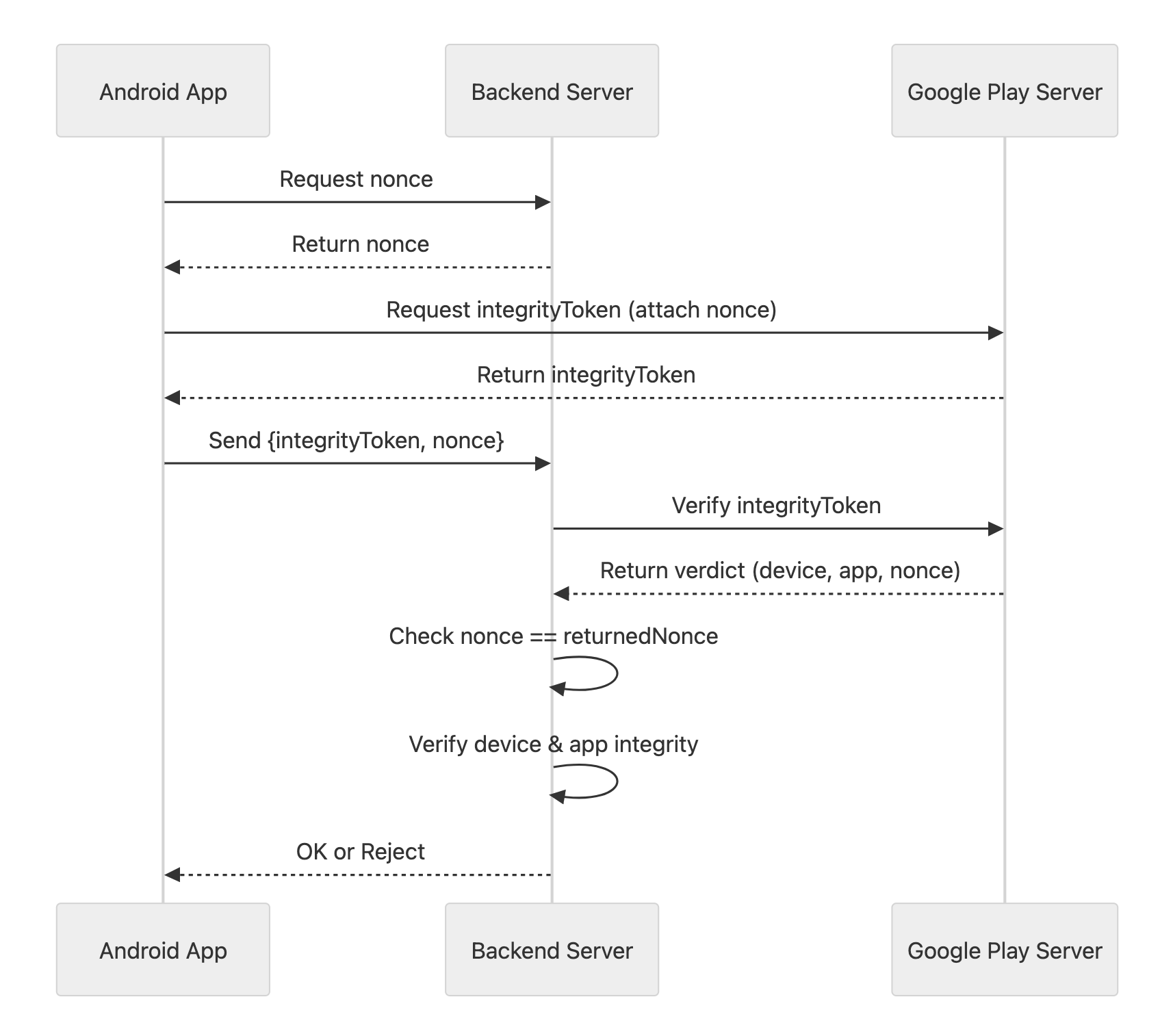
Implementation Example - Android: Play Integrity Request (Kotlin)
@Singleton
class IntegrityManager @Inject constructor(@ApplicationContext private val context: Context) {
    private val integrityManager = IntegrityManagerFactory.create(context)

    suspend fun requestIntegrityToken(nonce: String): Result<IntegrityResponse> {
        val request = IntegrityTokenRequest.builder()
            .setCloudProjectNumber(CLOUD_PROJECT_NUMBER)
            .setNonce(nonce)
            .build()

        return try {
            val response = integrityManager.requestIntegrityToken(request).await()
            Result.success(IntegrityResponse(token = response.token(), nonce = nonce))
        } catch (e: Exception) {
            Result.failure(e)
        }
    }
}
Implementation of Play Integrity
2.3. Backend Implementation
To keep the system scalable, separate responsibilities into dedicated services for parsing ASN.1/CBOR and validating signatures.
| Service | Responsibility | Key Validations |
| IntegrityVerifier (Android) | Cloud-to-Cloud Verification | - Nonce equality check - Device integrity level - App Recognition ( |
| AppAttestVerifier (iOS) | Binary Parsing & Validation | - Bundle ID ( - Cert chain to Apple Root - Nonce extraction (OID |
| AuthService | Orchestration & Persistence | - Linking Verifiers to business flows - Persisting |
Unlike Android's JSON-friendly approach, iOS doesn't return a simple JSON. The attestationObject is a binary blob encoded in CBOR. My research showed that the Backend must perform the following validation chain:
- Parse the CBOR structure to extract
authDataandattStmt. - Verify the certificate chain starting from the Apple Root CA.
- Extract the Public Key from
authDatato store for future use.
3. Real-World Scenarios & UX Optimization
I spent significant time refining these End-to-End flows to ensure security doesn't break the user experience:
- New Registration: Requires full Attestation (iOS) or Integrity Token (Android).
- Existing Device Login: Use Assertion (iOS) to save resources and verify
signCount. - Device Migration: When a user gets a new phone, the iOS app won't find the old key in the Keychain (
noKeyFound).- Solution: Fallback mechanism. If Assertion fails, the app automatically triggers a new Attestation flow to update the Key on the server.
- Social Login: Try Assertion first. If the User is null or
KeyIdmismatches, require Attestation to "Link" the device to the social account. - Lazy Attestation: Don’t force users to Attest the moment they open the app. Instead, trigger it only during sensitive actions like "Checkout" or "Change Password."
4. Final Verdict
4.1. The Pros
- Bot-Proof: It is nearly impossible to spoof a signature from a hardware security chip. Only real devices pass.
- App Integrity: Guarantees the request comes from your official app binary, not a modified version.
4.2. The Cons
- Third-Party Dependency: If Apple or Google servers go down, your validation flow might be affected.
- Complexity: It is labor-intensive to parse and verify complex data formats like CBOR and ASN.1.
4.3.When should we use it?
Not every API needs this heavy-duty protection. I recommend prioritizing based on risk:
- Critical Flows (Must-Have): Registration (blocking bot farms/promo abuse), Payments/Withdrawals, and changing sensitive info (passwords, emails).
- High-Value Flows (Should-Have): Login (using Assertion for passwordless-feel security) and Comments/Reviews (to prevent spam seeding).
- When to Skip: Public data fetching (Product lists, news). Requiring signatures here only adds unnecessary latency. Also, consider an "Allow-list" for legacy devices (Androids without Play Integrity or iOS < 14.0).